
Nissan Rogue Drive Modes (D-Mode): How & When to Use Them
The modern Nissan Rogue is equipped with a drive mode system that can be selected based on road conditions.
Depending on the Rogue model you drive, you’ll have several driving modes to choose from.
All models come equipped with Auto, Eco, and Sport modes.
Other models include special modes such as Off-road mode and Snow mode.
Availability & How to Use
Depending on whether you have a front-wheel-drive or all-wheel-drive model, the driving modes available may differ significantly.
- FWD Models Equipped with 3 essential modes (Standard/Auto, Eco, and Sport))
- AWD Models: Equipped with 5 specialized modes (Standard/Auto, Sport, Eco, Snow, and Off-Road)
Switching driving modes on these two models differs slightly. The front-wheel-drive model uses a “D-MODE” button to change modes, while the AWD model features a rotary knob.
Both are positioned on the center console for easy access while driving. You can easily switch driving modes even while driving without having to stop the car first.
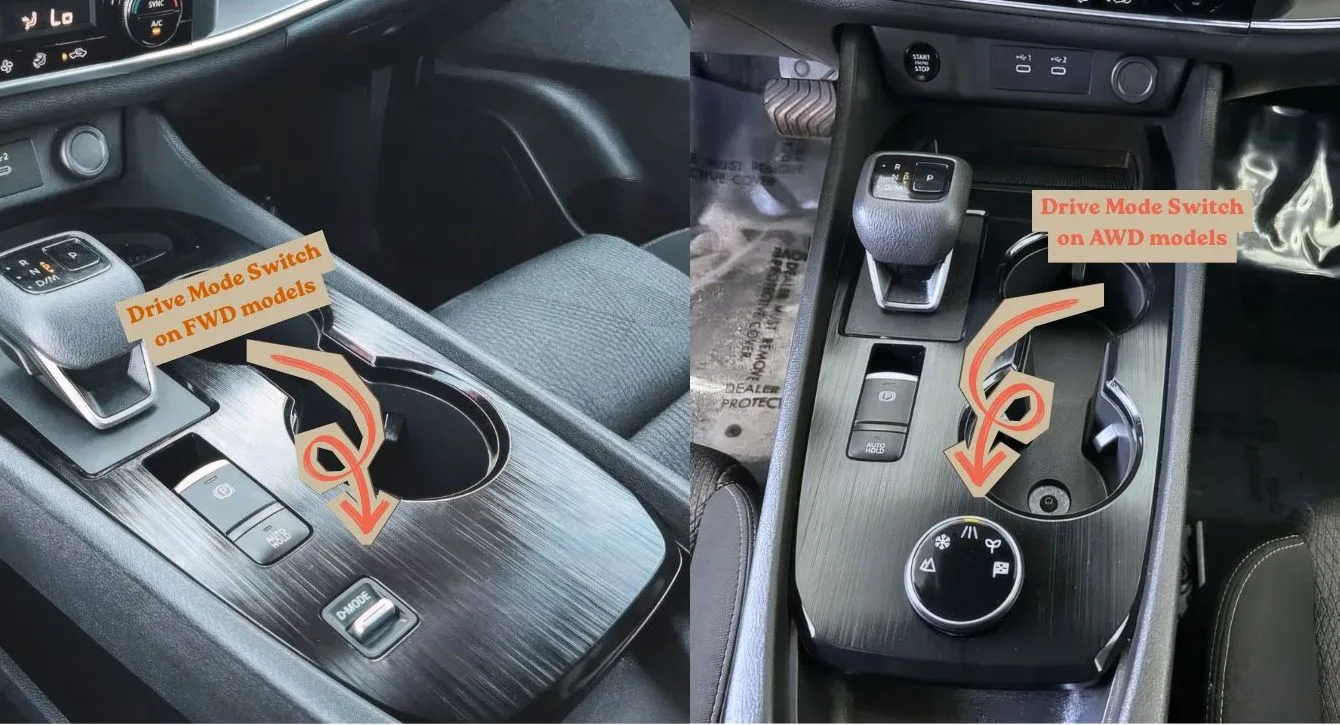
To change driving modes, just turn the knob (AWD) or press the “D-MODE” button (FWD); the selected mode will appear on the instrument cluster display (speedometer).
Okay, after this, we’ll go over each of the driving modes.
The Standard Three
Auto
This is a “set it and forget it” driving mode for most people. On AWD models, this mode is indicated by a highway symbol with a broken white center line.
When in this setting, the Rogue’s computer balances fuel economy and performance. On AWD models, the system intelligently distributes power to the front and rear wheels only when slippage is detected.
This Auto/Normal driving mode is ideal for everyday driving, providing ample power while delivering good fuel economy.
Eco Mode
Eco mode is indicated by a “leaf icon” on the selector. This mode is ideal if you’re trying to save as much fuel as possible.
Eco mode is suitable for city commuting or long highway drives. However, when Eco mode is activated, the car will feel a bit sluggish, and the gas pedal won’t be as responsive. This is intentional to prevent sudden, fuel-consuming revs.
If you’d like to learn more about Eco Mode, please check out Nissan Rogue Eco Mode for a detailed and comprehensive explanation.
Sport Mode
Sport Mode is marked by a checkered flag icon on the selector knob. When activated, the Rogue’s computer makes the engine operate more aggressively, sharpening throttle response and holding gears longer to keep the engine in its peak power range.
You’ll notice a significant change in acceleration in Sport Mode; it gives the car a more agile feel, making it ideal for overtaking other vehicles.
Sport Mode is the opposite of Eco Mode, delivering strong power but using more fuel.
The AWD Exclusives
If you’re driving a Rogue with all-wheel drive, there are two additional driving modes to choose from.
Snow Mode
Just like the name suggests, the snow mode is designed for winter driving. In winter, roads are often icy and slippery.
Snow Mode smooths the car’s acceleration by reducing initial torque to the wheels, helping prevent slipping on icy surfaces.
Off-Road Mode
This mode is designed for those who love adventure. It optimizes engine torque and transmission to maintain momentum on uneven terrain.
It’s ideal for driving in low-traction conditions such as dirt roads, sand, mud, gravel, etc.
When this mode is active, the computer will direct the vehicle to transfer power from slipping wheels to those with traction. This is an advanced traction control system.
Which Mode Should You Use?
If you drive a Rogue AWD, congratulations, you have five driving modes to choose from, which you can adjust to suit your driving conditions.
I’d recommend using Auto mode for most situations; it’s the best balance between performance and fuel efficiency.
However, when your driving conditions change, I suggest switching driving modes.
In winter and on slippery roads, choose Snow mode. When driving on dirt roads, Off-Road mode is a great option.
Eco mode is also quite helpful for saving even more fuel; you can select this mode when you’re running low on fuel and want to conserve as much as possible to make it to the next gas station.
If you’re driving a Rogue with FWD, don’t worry—the Auto, Sport, and Eco driving modes are more than sufficient and can accommodate your daily driving needs.
In fact, 10 years ago, most vehicles didn’t have special driving modes, and we were just fine. But with these special modes, they certainly help drivers even more.
Quick Summary Table
| Drive Mode | FWD Available? | AWD Available? | Best Used For… |
| Standard | Yes | Yes | Everyday driving |
| Eco | Yes | Yes | Saving gas / Heavy traffic |
| Sport | Yes | Yes | Overtaking / Spirited driving |
| Snow | No | Yes | Icy or slippery roads |
| Off-road | No | Yes | Gravel, dirt, or light trails |
Frequently Asked Questions

Tristan has been deep in the automotive world since 2014, long before NissanRogueInfo.com started. His interest in the Rogue actually goes back to high school when he saw a first-gen model modified for off-roading—a moment that stuck with him ever since.
With a Bachelor of Technology and over a decade of professional car journalism under his belt, Tristan doesn’t just write about specs; he’s usually the one under the hood of his own Nissan Rogue or Honda CR-V, figuring out DIY fixes and maintenance tricks. He built this site to share that hands-on experience with other SUV owners who want practical, no-nonsense advice.
2 Comments